
Skip to content

Write films. Think cinema.

From screenplay to call sheet. Without retyping a thing.

The screenwriting software built for French cinema: French format, breakdown, shooting schedule, call sheet.

The full demo, no account

Free for one project, no credit card.

No-account demoElement: -
INT. FILM SET - NIGHT
A half-struck apartment set. The lights run hot. MAUD (50s), script supervisor, notebook on her knees, tallies the takes in pencil.
ELIAS
(eyes on the monitor)
Let’s go again.
MAUD
That’s twenty-two. Your actress can’t feel her hands anymore.
ELIAS
Then she’ll act with someone else’s.
Silence. An electrician laughs, then thinks better of it. NOOR (25), camera assistant, wipes the lens without a word.
NOOR
Battery’s good for ten more minutes.
MAUD
Ten minutes. One take. The last one.
  • Enter: the next block, in the right format
  • Tab: change element
  • On an empty line, type “int. kitchen - night”

This is the real editor. No account, and nothing is saved.

One scene, end to end

Written once. Used everywhere.

The scene becomes shots, a camera, a light, a line on the schedule, then a take. Nothing is typed twice.

The scene is written. Location, time of day and characters are picked up as you type.

Four views of the same film.

Text, shots, space, images: every tool reads the same project, and the whole crew works in it at once.

01 / 04

Script

The story.

Industry format, writing together, comments, coloured revisions, breakdown straight from the text.

Open Script

All features

Who it’s for

Every role finds its tool.

  • Director

    Break each scene into shots, place cameras and lights on the floor plan, gather your references. Right next to the text.

    Storyboard and floor plan
  • Screenwriter

    The format falls into place as you type. Versions, word-by-word comparison and live co-writing.

    Try the editor
  • Production manager

    The breakdown comes from the text. The shooting schedule and call sheets follow, without retyping a thing.

    From script to shoot
  • Producer

    Budget, financing plan and funding file in the same project. The script is read with a code, no account needed.

    For production companies

The set in 3D

The set, before the shoot.

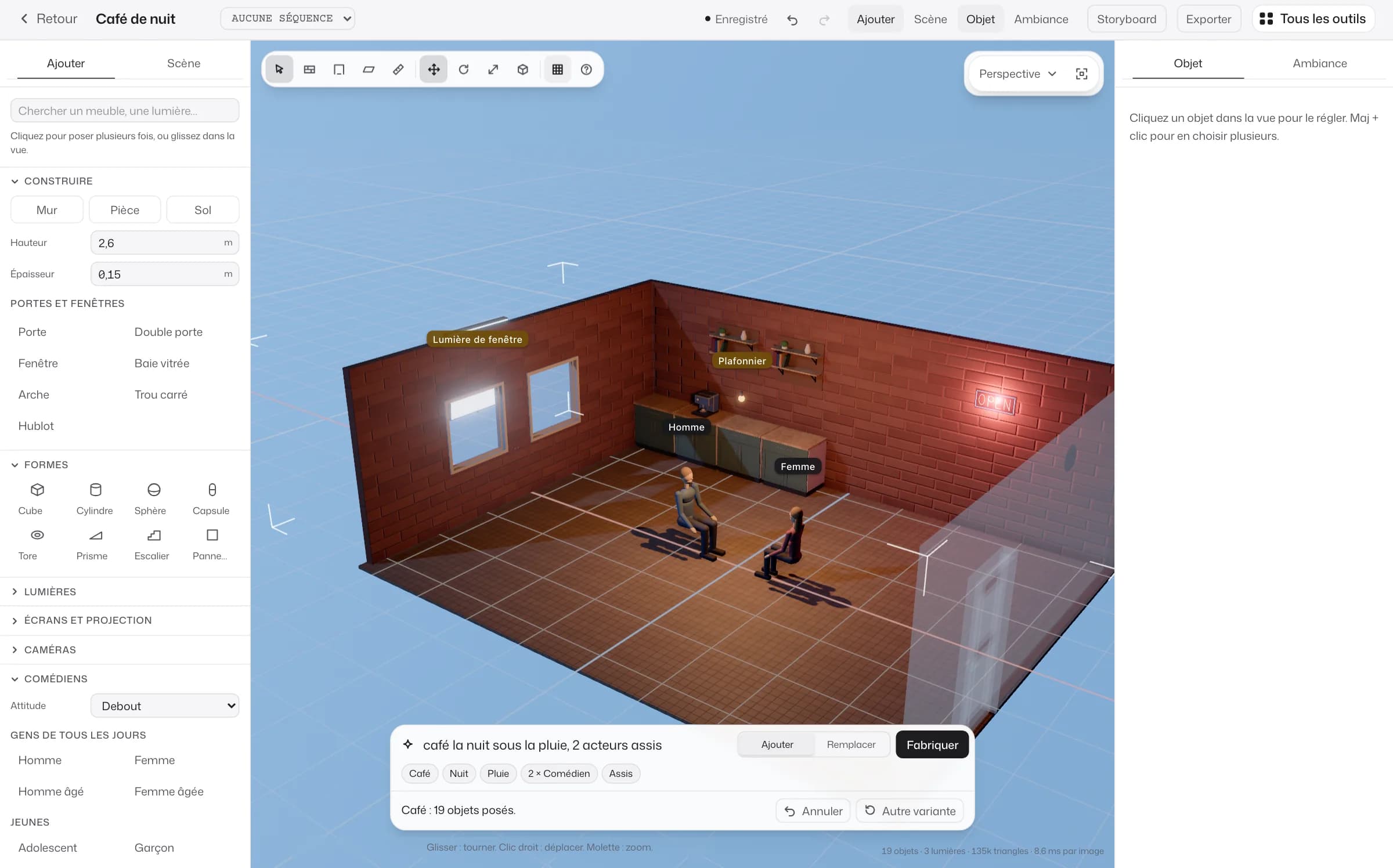
Describe a place in one sentence and it builds itself. Place actors, lights and cameras, then pull the storyboard and the floor plan from it.

Try

  • forest
  • beach at sunset
  • shoot with an eye-level camera and 3 actors
  • theatre stage with 5 actors in a circle
The DUKE-DRAFT 3D workshop: a brick café at night, two seated actors, and the sentence that built it.
  • One sentence is enough

    Place, time, weather, actors, camera: type what you want to see. Walls, furniture, lights and mood go down at once, and one gesture undoes it all.

  • 18 actors, ready to go

    Mannequins already dressed, from a child to a detective. Place them, turn them, choose their pose.

  • Lights and cameras

    Spotlights set in kelvin, cameras with their focal length and field of view. Save your viewpoints and come back to them in one click.

  • From film to theatre

    A room, a film set, or five ready-made theatres: proscenium, black box, thrust, in the round, traverse.

  • Projected images and video

    A projector and screens in the set: project an image or a video, and play the animations.

  • From set to storyboard

    Every camera and saved view becomes a shot, with its picture, lens and characters. Export a 4K image, a JPEG or a 3D model.

Linked to your screenplay.

From each scene, open its moodboard, floor plan, 3D set and storyboard, or create them in one click, already named after it. And every board points back to its scene.

Sc. 12INT. CAFÉ – NIGHT

  • MoodboardBrick, neon, rain
  • Floor planTables and camera A · 35 mm
  • 3D set19 objects, 2 actors
  • Storyboard4 shots from the cameras

What changes

More than a screenwriting app.

Writing, formatting, exporting: a classic screenwriting app does that. Here is what DUKE-DRAFT does on top, in the same project.

What DUKE-DRAFT does on top of a classic screenwriting app
FeatureA classic screenwriting appDUKE-DRAFT
Breakdown from the text: cast, sets, propsNoIncluded
Shooting schedule, day by dayNoIncluded
Call sheetsNoIncluded
Storyboard, floor plan and moodboard in the same projectNoIncluded
Equipment list from the floor planNoIncluded
Budget, financing plan and funding fileNoIncluded
Read with a code, no account, notes that come back to the editorNoIncluded

Write together

Your co-writer writes at the same time as you. You see their text arrive, their cursor, their name.

Live
What one types appears on the other’s screen as it is written. Two people can write in the same line: every letter is kept.
Shared project by project
Invite someone to one screenplay, to write or to read. They see nothing else in your workspace.
Back in your hands at any time
Remove access, lock a version: it takes effect at once, even in a tab left open.

Read by code

Send your script. No account needed.

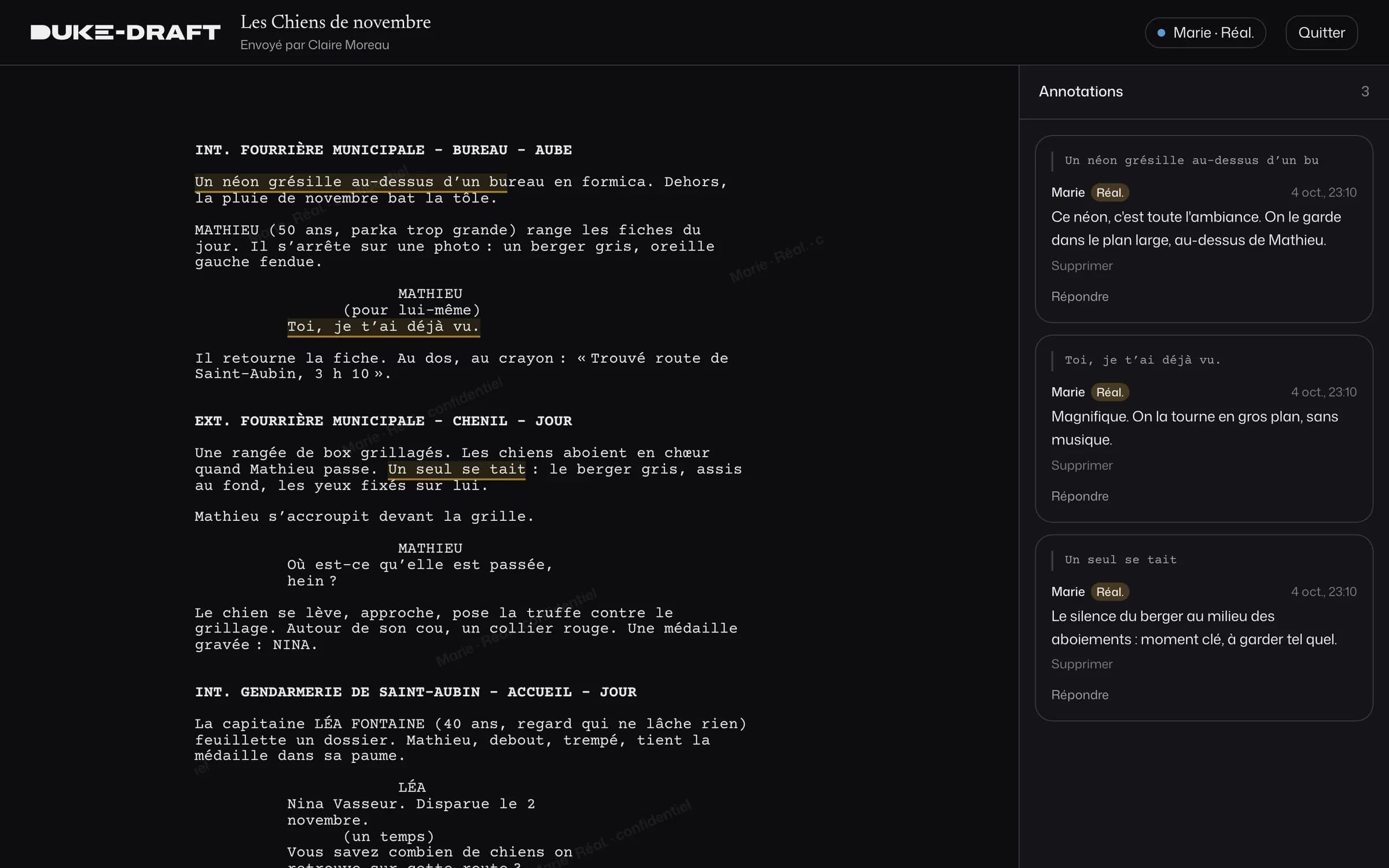
A director, a producer, a script doctor: they get a code, read, and annotate next to the text. Their notes land in your editor.

  1. 1

    Create a code

    Who it’s for, and for how long: 7, 30 or 90 days. A message ready to send.

  2. 2

    They read and annotate

    First name, role on the film, and off they go. Their name watermarked on every page.

  3. 3

    You reply

    Every note signed “Marie · Director” in your comments. One click cuts access.

A guest reading: the script read-only and their signed notes next to the text.

Subscription

Writing is free, with no time limit. The rest comes when you need it.

Two months free on the year

Free

To discover DUKE-DRAFT.

€0

Free for as long as you like

  • Editor with professional formatting, film and theatre
  • Storyboard, floor plan, breakdown, budget
  • Writing together, versions and revisions
  • Final Draft, Fountain and Word, in and out, plus PDF export
  • One project at a time
Recommended

Studio

For writers and directors.

€12/ month

Billed monthly, no commitment

Try Studio free for 1 month

Nothing to pay for 30 days, then €12 per month.

  • Everything in Free
  • Unlimited projects
  • AI assistant, 50 requests a month
  • Four subscriber-only themes

Production

For professional teams.

€29/ month

Billed monthly, no commitment

Try Production free for 1 month

Nothing to pay for 30 days, then €29 per month.

  • Everything in Studio
  • AI assistant with no limit
  • Email support within 24 hours
  • No commitment

    Cancel from the Subscription page: access stays open until the end of the paid period.

  • Secure payment

    Payment goes through Stripe. We never see your card number.

  • Your scripts stay yours

    PDF, Word, Final Draft and Fountain export on every plan, Free included.

  • A month to try

    On Studio and Production, once per account. Nothing is charged for 30 days.

Accepted payment methods

  • CB
  • Visa
  • Mastercard
  • Apple Pay
  • Google Pay

Card, Apple Pay or Google Pay, on a payment page secured by Stripe. Apple Pay and Google Pay appear on devices where they are set up. We never see your card number.

Compare the plans

What changes from one plan to the next, and everything that stays included.

FreeFree
Projects
1 at a time
Assistant requestsStoryboard shot list, bilingual version, coverage
Not included
Subscriber-only themes
Not included
Email support within 24 hours
Not included
One free month, once per account
Not included
Studio€12 / month
Projects
Unlimited
Assistant requestsStoryboard shot list, bilingual version, coverage
50 a month
Subscriber-only themes
4
Email support within 24 hours
Not included
One free month, once per account
Included
Production€29 / month
Projects
Unlimited
Assistant requestsStoryboard shot list, bilingual version, coverage
Unlimited
Subscriber-only themes
4
Email support within 24 hours
Included
One free month, once per account
Included
Included in every plan8 features, free plan included
  • Editor with professional formatting, film and theatre
  • Writing together and comments
  • Versions, comparison and coloured revisions
  • Final Draft, Fountain and Word, in and out, plus PDF export
  • Full backup of your projects
  • Storyboard, floor plan, moodboard
  • Breakdown, shooting schedule, call sheets
  • Equipment list, budget, financing plan

Frequently asked questions

Is the Free plan really free?

Yes, with no time limit and no card. It gives you the editor and every film tool, for one project at a time. A project someone shares with you doesn’t count towards that limit.

How does the free month work?

It’s offered once per account, on Studio or Production. Your card is asked for at the start, but nothing is charged for 30 days. Cancel before the trial ends and you pay nothing.

Monthly or yearly?

Yearly costs ten months for twelve: €120 instead of €144 for Studio, €290 instead of €348 for Production. Monthly stops from one month to the next.

How do I cancel?

From the Subscription page of your account, in one click. Access stays open until the end of the period already paid, and you can change your mind until then.

What happens to my projects if I go back to Free?

They stay where they are, with their scripts and versions. Only creating a new project is blocked while you have more than one. The assistant and the subscriber-only themes close.

What is an assistant request?

One request to the AI assistant: the shot list for a scene in the storyboard, the translation of a scene in the bilingual version, or a coverage report. The counter resets every 30 days. The text of the request goes to the assistant’s provider for the answer, and only then. The provider is named on the Privacy page.

I have a licence code.

Enter it on the Subscription page of your account: it opens access with no payment.

Where are my invoices?

On the Subscription page, each with its PDF. Your card is changed in Stripe’s secure portal, from the same page.

Your scripts stay yours

A screenplay is confidential work. Every access is checked on the server, project by project. We don’t read your text, we don’t train models on it, and you can export everything whenever you like.

The AI assistant

The AI assistant does not write your screenplay for you. It only acts when you ask it to: propose a shot list, write a coverage report, translate a version. DUKE trains no model on your text.

From script to shoot.

Every scene. Every shot. One place.